Linux server security
Security checker.
Know what needs
your attention.
Find known vulnerabilities in the packages installed on your Linux servers. See which servers need attention, which issues have a fix, and what to review first.
Free tier available. No credit card required.
Every server in one view
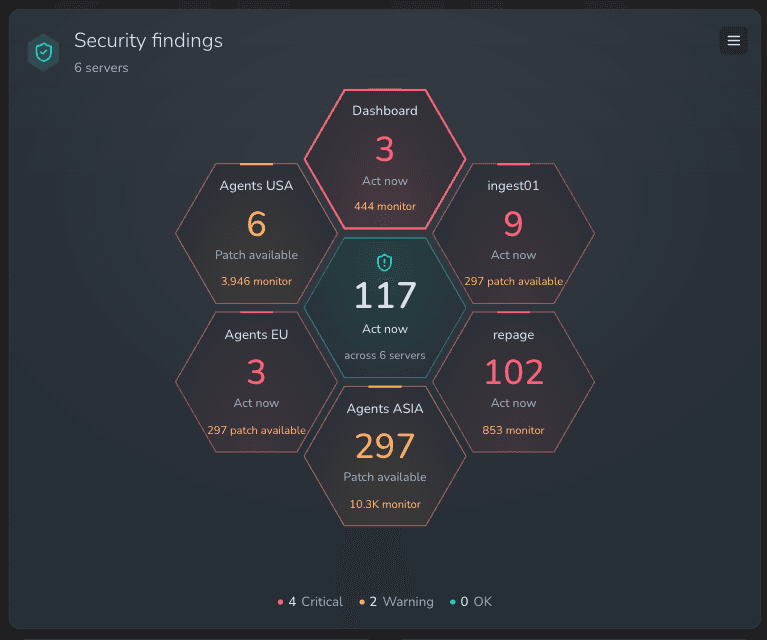
One hexagon per server. See critical and warning states across your infrastructure, then open a server’s Security tab from the widget.
Prioritize with evidence
Use known exploitation, EPSS predictions, network attack vectors and fixed versions to decide which findings need attention.
Alerts that match the priority
Get critical alerts for issues to act on now and warnings for remotely exploitable High or Critical issues with an available fix.
From overview to evidence
Open a finding.
See the details behind it.
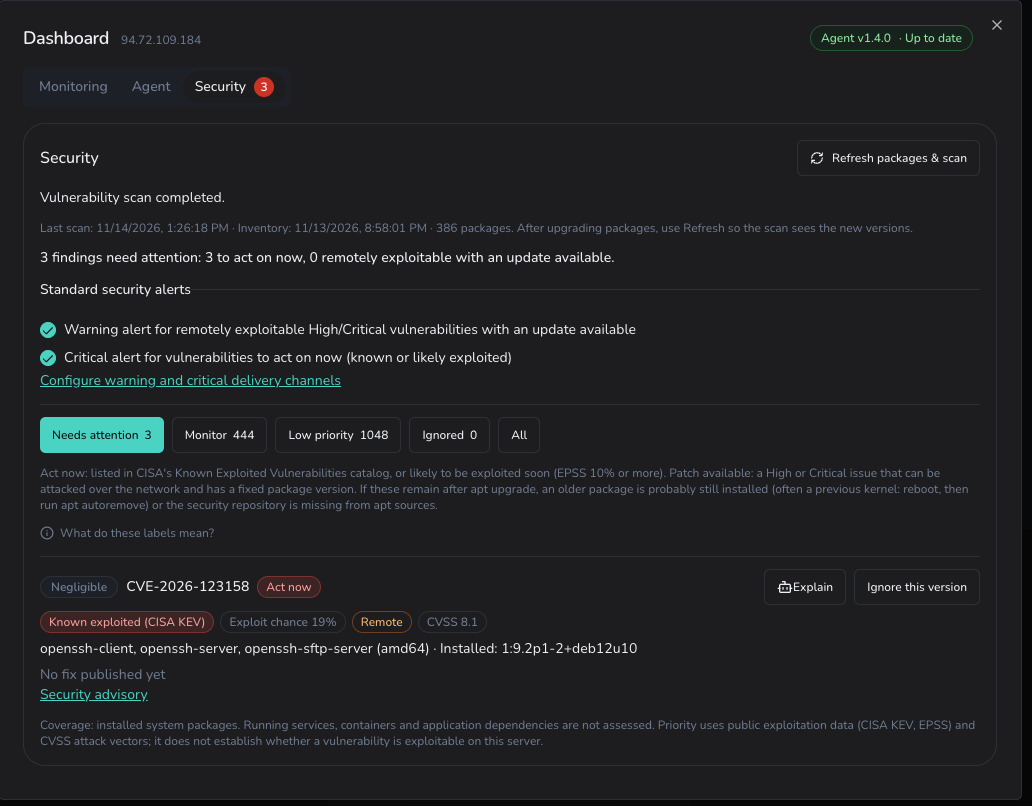
Inspect affected packages, installed versions, available fixes and advisory links. Filter findings by priority, ask the assistant to explain an issue, or record a reviewed exception for a specific package version.
A clear order of action
Severity is one signal.
Priority tells you where to start.
A long CVE list needs context. Findings are grouped into four priorities so you can focus on known exploitation and actionable patches while keeping other issues visible.
Act now
Known exploited vulnerabilities in CISA KEV, or findings with a high predicted exploitation probability that have not been dismissed by the distribution.
Critical alert
Patch available
High or Critical vulnerabilities with a network attack vector and a published fixed package version.
Warning alert
Monitor
Other findings to keep in view, including issues without a published fix or those requiring local access.
Visible in your report
Low priority
Low or Negligible severity issues and findings the distribution has marked as not requiring a fix.
Visible in your report
Priority uses public exploitation data and advisory metadata. Review each finding in the context of your server’s configuration and exposure.
Check. Review. Verify.
Keep security checks
in your monitoring workflow.
Enable package security checks on your connected Linux servers. Keep the overview beside your uptime and resource widgets, with security alerts using your configured warning and critical delivery channels.
Explore infrastructure monitoring- 01
Enable package inventory collection
Opt in to security monitoring per server. The agent collects installed DEB packages for advisory matching.
- 02
Review findings and receive alerts
Stored inventories are rescanned every six hours. Review priorities in the dashboard and receive alerts through email, Slack, Telegram or webhooks.
- 03
Refresh after you update
Install updates using your normal maintenance process, then request fresh packages and a scan. Previous findings stay visible until the new scan completes.
Know what your scan covers
The checker assesses system packages installed through the package manager on Ubuntu and Debian servers. Containers, application dependencies, running services and manually installed software are outside its coverage. Scan and inventory timestamps help you judge freshness; missing or stale data is shown explicitly.
The practical details
Security checker FAQ
Supported servers, scan intervals and how findings are reviewed.
What does the Security checker scan?
It checks the system packages installed on your server against known vulnerability advisories from the distribution and other public sources. Containers, application dependencies, running services and manually installed software are outside its coverage. A package finding does not establish whether the vulnerability is exploitable on your server.
Which Linux distributions are supported?
Ubuntu and Debian, including older releases that still have published advisory data, such as Ubuntu 18.04 and 20.04. Servers running other Linux distributions can still use infrastructure monitoring for CPU, memory, disk and PostgreSQL.
How do I enable security monitoring?
Connect your Linux server using the Sentinelboard agent and enable security monitoring for that server. Package inventory collection requires agent 1.2.0 or newer. Upgrade to agent 1.4.0 or newer to request a fresh inventory and scan from the Security tab. Add the Security findings widget to see your connected servers together.
How often are packages checked?
The agent normally collects a package inventory daily. Stored inventories are rescanned every six hours so new advisories can be detected without package changes. After updating packages, use Refresh packages & scan to request a fresh inventory on the agent’s next scheduled run, usually within a minute.
Why do priorities differ from CVSS severity?
Severity describes the vulnerability’s potential impact. Sentinelboard also considers known exploitation, EPSS exploitation probability, network access, available fixes and the distribution’s assessment to decide what needs attention. Known exploited issues take priority even when the distribution assigns a lower severity.
Can I review or ignore a finding?
Open a server’s Security tab to inspect affected packages, installed and fixed versions, exploitation evidence and advisory links. Use Explain to ask the built-in assistant for help reviewing a finding. If you determine it is not exploitable for that package version on your server, you can ignore that version with an optional reason. A different installed version is assessed separately.
Does the checker install security updates?
You review and install updates using your normal server maintenance process. The checker reports findings and available fixed versions. After an upgrade, refresh the package inventory and scan to verify which findings have been resolved.
Bring server security into view.
Keep package vulnerabilities, server health and uptime in one dashboard. Start with your first Linux server.
Free tier available. No credit card required.