Infrastructure
monitoring
for Linux servers.
Monitor CPU, memory and disk usage on your Linux VPS or dedicated server. See resource history and get alerts before sustained pressure becomes an outage.
Free tier available. No credit card required.
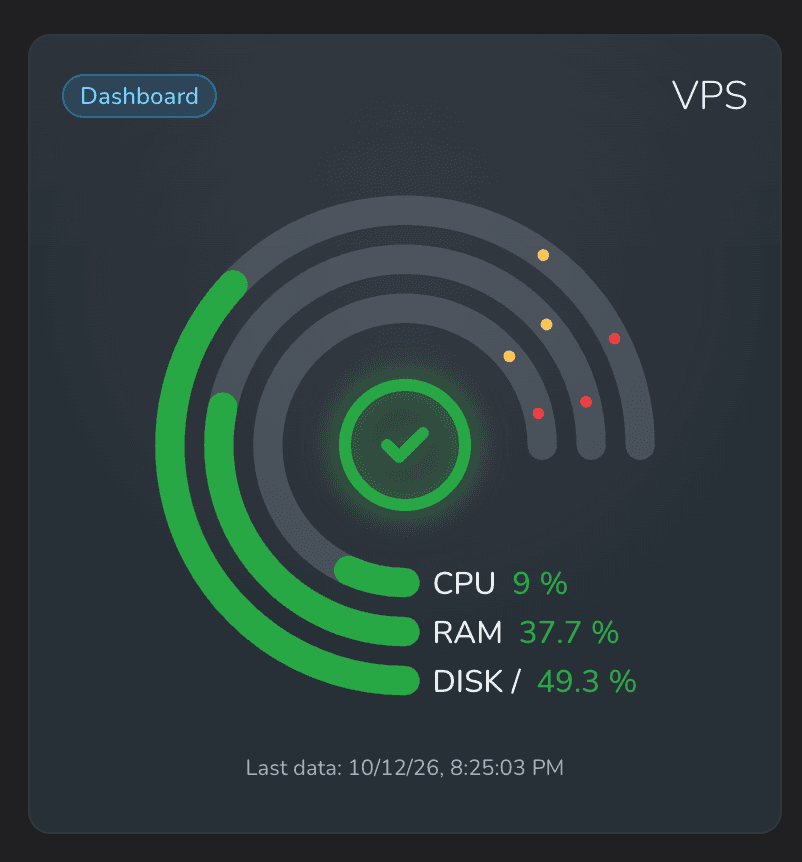
All three resources are within their configured limits.
CPU usage monitoring
Track CPU utilization and sustained server load from traffic, application processes and background jobs.
Memory usage monitoring
Monitor RAM usage and available memory as your application and traffic grow.
Disk space monitoring
Track storage usage by mountpoint and catch growing logs, backups and uploads before the disk fills up.
Across your infrastructure
Every server.
One clear overview.
Bring production hosts and regional agents into one Server Status widget. See how many servers are healthy, warning or critical, with your overall infrastructure status in the center.
- One segment for each connected server.
- Spot resource pressure and missing measurements.
- Inspect a segment to see which server needs attention.
Hover, tap or use arrow keys to explore the preview.
Your server, your view
Server monitoring widgets.
CPU, memory and disk.
Keep the whole server in sight, or give each resource its own widget. One connection powers both.
01 / The complete picture
Server health at a glance.
The server overview brings CPU, memory and disk into one widget. Its status reflects resource pressure and whether fresh measurements are arriving.
Select a ring to inspect its current value. Add individual widgets when you want history and dedicated alerts.
Try the rings in this preview02 / CPU usage
CPU monitoring for sustained server load.
Track CPU utilization over time to spot sustained load from traffic, background jobs, or a busy application. Set warning and critical thresholds for each server; the defaults are 85% and 95%.
Average non-idle usage across logical CPUs, measured between agent runs.
03 / Memory usage
Memory monitoring with available RAM in view.
Monitor Linux server memory usage as a percentage and see available RAM in GiB. Use measurement history to spot growing memory pressure. Default warning and critical thresholds are 85% and 95%.
Based on Linux available memory, including cache the system can reclaim.
04 / Disk usage · /
Disk space monitoring for each mountpoint.
Track disk usage and available space for each discovered mountpoint. Spot growing logs, uploads and backups before storage fills up. Default disk space alerts warn above 80% usage and become critical above 90%.
Includes reserved blocks that are unavailable to an unprivileged process. Inode widgets are also available.
Alerts with context
Server resource alerts.
Catch sustained pressure.
A brief spike should not ruin your evening. Capacity alerts wait for five consecutive measurements above your limit, so sustained pressure gets your attention.
Monitoring the monitor, too. Missing host data triggers a warning after 2 minutes and a critical state after 3 minutes by default.
Disk usage · Production VPS
ExampleFive consecutive measurements above the 80% warning limit
Useful defaults. Adjustable for each widget.
Monitoring alerts and notification channelsServer metrics, collected your way
A Linux server monitoring agent.
The Sentinelboard agent collects CPU, memory and disk measurements every minute and sends them securely to your dashboard. Built for Linux servers on AMD64 and ARM64.
Prefer OpenTelemetry?
Use your own OpenTelemetry Collector Contrib to send supported host metrics. Keep your existing collection pipeline and get the same server widgets, measurement history and alerts in Sentinelboard.
No administrator privileges required
Runs under a regular user account, without sudo or a system service to maintain.
No process running between collections
The agent collects measurements, sends them and exits. There is no resident monitoring daemon.
No inbound ports to open
Measurements leave your server over HTTPS. Your server does not need to accept incoming monitoring connections.
One agent for all your resource widgets
The server overview, CPU, memory and disk widgets share a single agent, with independent limits and alerts.
The practical details
Infrastructure monitoring FAQ
Server requirements, collection intervals and how resource usage is measured.
What is infrastructure monitoring?
Infrastructure monitoring tracks the health and resource usage of the servers that run your applications. Sentinelboard monitors Linux server CPU utilization, available memory, disk space and inodes, with history and alerts for sustained resource pressure or missing measurements.
Can I see all my servers in one widget?
Yes. The Server Status widget represents each connected server as a segment and shows an overall status, with counts for healthy, warning and critical servers. Select a server to inspect its status and resource usage. You can also add per-server overview and individual CPU, memory and disk widgets for more detail.
Which servers can I monitor?
The Sentinelboard agent supports Linux on AMD64 and ARM64, including Ubuntu and Debian servers. It runs under a regular user account with access to host statistics and user cron. You can also use OpenTelemetry Collector Contrib to send supported host metrics from your existing monitoring pipeline.
Do I need a separate agent for each widget?
One agent supplies the overview and all individual resource widgets for that server. Each widget has its own limits and notifications, while sharing the same server connection.
How often are server metrics collected?
The Sentinelboard agent collects host measurements every minute using your current user’s cron. Capacity alerts require five consecutive measurements above the configured threshold, with no gap longer than 90 seconds between them. The server overview separately tracks whether fresh measurements are arriving.
How are memory and disk usage calculated?
Memory usage is based on Linux available memory, including reclaimable cache, so cached memory is not automatically treated as unavailable. Disk usage includes reserved blocks that an unprivileged process cannot use. Disk and memory widgets also show available space in GiB.
What happens if measurements stop arriving?
The server overview tracks data freshness. By default, it warns after more than two minutes without valid host measurements and becomes critical after more than three minutes. Individual resource widgets show that their data is no longer current.
Less manual checking. Earlier warnings.
Start monitoring your infrastructure.
Track server resources alongside website uptime monitoring, API response monitoring and application error tracking in Sentinelboard.